AI

People routinely share personal data with AI chatbots and ask them intimate questions, covering everything from mental and physical health to finances, red tape, sexual fantasies, and plenty more. Many assume these exchanges remain strictly private between user and model.
Yet recent investigations by journalists show that complete privacy is far from guaranteed when interacting with AI. It turns out that the developers of two popular tools — OpenAI’s ChatGPT and Microsoft’s Copilot — hire human staff to read user prompts and check the AI’s responses.
According to information obtained by the journalists, OpenAI relies on meatbags to judge whether its AI responds accurately to text prompts, while Microsoft uses human contractors to check how faithfully its AI generates or edits images based on user requests. Workers interviewed by the journalists say they sometimes review user prompts that have not been anonymized. In this piece, we examine both cases in detail, and explain how to keep your conversations with AI private.
Who’s reading your ChatGPT conversations, how, and why
In mid-September, 404 Media reported on an OpenAI initiative known as Project Lily, through which the company brings in outside contractors to evaluate and improve the quality of its AI’s responses to user prompts. According to 404 Media, a company named Mercor helps hire these reviewers. Remember the name Mercor, because we’ll come back to it.
The journalists got hold of a trove of Project Lily documents: instructions for employees, Slack conversations, real ChatGPT user prompts, and the scoring system reviewers use to rate the chatbot’s responses. Judging by these materials, a chat review can go through several stages.
- Read the prompt. The reviewer selects a task in a dedicated system and is presented with a real user’s ChatGPT prompt. At times, the prompt is accompanied by the chat history and a brief profile of the user compiled from earlier conversations.
- Work out the user’s intent. After reading the prompt, the reviewer has to briefly describe what the user was trying to achieve with ChatGPT. Examples include answering a question, breaking down a complex topic, or editing a work message.
- Analyze the AI’s responses. Next, the reviewer is shown four ChatGPT responses to the same prompt. They rate how well each response meets the established criteria, flag at least three strong or weak passages, and explain their score.
- Rate. Each response is rated on a scale from 1 to 7, where 1 means the output is completely unacceptable and 7 means it can barely be improved upon. The score reflects not just how helpful and accurate the information is, but also tone, clarity, and how relevant it is to the user’s prompt.
- Justify the score. Finally, the reviewer writes a brief explanation justifying the score. It can run anywhere from a couple of sentences to a full paragraph.
Importantly, people working on Project Lily can’t see the names or contact details in users’ ChatGPT profiles. But anyone who has ever chatted with AI can guess the catch: the prompts themselves often contain personal information that can reveal who the user is. The simplest example is a user who pastes their resume into an AI so it can proofread and polish it before it goes to a potential employer.
Before routing prompts to human reviewers, OpenAI runs them through a specialized AI model that is, in theory, supposed to strip out any information that can identify somebody. Even so, Project Lily reviewers say they often come across prompts that contain users’ personal data. OpenAI acknowledges that its anonymization model can make mistakes and miss certain personal details — particularly those details that are difficult to detect without broader context.
But where does OpenAI get these prompts from in the first place? For users on ChatGPT’s Free, Plus, and Pro tiers, OpenAI includes a setting that lets the company use their chats to improve its AI models. It’s enabled by default. This means the contents of those conversations can be used, among other things, for human review of ChatGPT’s responses. For Enterprise, Business, and Edu users, this setting is off by default, so their conversations aren’t used to improve AI models unless they give their permission.
If you’re on one of the other plans and you don’t want your conversations used to train and improve models, you need to disable this option yourself. The change applies only to new conversations and it’s not retroactive. At the end of this post, we’ll show you how to at least keep your future chats out of OpenAI’s grabby hands.
Who OpenAI trusts to review ChatGPT users’ prompts
404 Media was informed that a recruiting firm called Crossing Hurdles finds candidates and sends them to Mercor — the AI training company mentioned above. According to one worker, it’s Mercor that directly pays the contractors reviewing ChatGPT’s responses, offering a fairly generous rate of more than US$50 an hour.
In April of this year, another AI heavyweight — Meta — halted its business ties with Mercor after a large-scale data breach. The breach put at risk confidential AI training data that Mercor had prepared for its clients. At the time of publication of this blogpost, the full scope of the breach — and exactly what data ended up in the attackers’ hands — remained unclear. Meanwhile, OpenAI kept working with Mercor despite the Meta incident.
Human reviewers don’t just look at user chats to improve model quality, either. OpenAI may review conversations if its automated systems flag signs of potentially dangerous behavior — such as intent to harm others. These reviews are conducted for safety reasons, and are undertaken regardless of whether you allow your conversations to be used for AI model training. So even if you’ve turned that setting off, there’s no guarantee that a human will never see your conversations.
Who sees your nudes besides Copilot?
A few weeks after the Project Lily story, the same 404 Media reported on a similar practice over at Microsoft. The company has employees rate how accurately Copilot generates or edits images at users’ requests. And this report raises, arguably, even more questions about user privacy.
The employees who rate these images told 404 Media that they often have to deal with sexualized requests from users. For example, some requests ask to enlarge a woman’s breasts in a photo, shorten her skirt, or put a person in a sexualized pose.
And it’s not just AI-generated characters. These requests also involve photos of real people, who may have no idea their images are being uploaded to Copilot for this kind of manipulation. Most users likely don’t realize, either, that the images they generate or edit with AI can also be viewed by strangers.
Based on both the employees accounts and the documents the journalists reviewed, the image-rating process works roughly as follows:
- Receive the user’s request. The reviewer gets both the original image uploaded to Copilot and the text instructions telling the AI how to edit it. For example, a user might ask to change how a person in a photo looks, or to add certain details.
- Compare the AI’s outputs. Next, the reviewer gets two versions of the image that Copilot generated from the same request. Their job is to compare the results with each other and with the original photo.
- Check against the request. The reviewer judges how closely the AI followed the user’s instructions. For example, if the user asked to change only one part of the image, the reviewer has to make sure everything else stayed untouched.
- Look for visual flaws. Image quality is rated separately: the reviewer looks for distortions, unnatural details, and other visual artifacts introduced by processing.
- Rate. Finally, the reviewer decides which of the two versions better fits the task, considering how accurately it follows the request, how well it keeps the original details, and image quality.
On paper, these steps may sound harmless enough. But reviewers themselves admit their job often boils down to judging whether an AI has made the breasts of the woman in the original image big enough. Furthermore, the images they review are not anonymized; the raw photos reveal people’s faces… as well as more intimate areas of their bodies.
The outlet also stresses that checking images for compliance with laws or platform rules isn’t part of the reviewers’ job. Some of the material they handle includes seriously disturbing requests — such as asking to undress girls who may be minors or to create images of animal sacrifice. Even so, the reviewers’ main task is to rate how accurately the AI carried out the user’s request — not to moderate that kind of content.
How can you protect your privacy when using chatbots?
As we’ve found out, conversations with AI, and the images you upload to chatbots, may be less private than many people expect. But can you do anything about it? ChatGPT users have more of a chance: they can opt out of having their data used to improve the models. With Copilot it’s more complicated.
When journalists asked about this, OpenAI representatives confirmed that the company uses ChatGPT users’ conversations to improve its AI models, and that includes having people review them. OpenAI stressed that before user prompts go to contractors, they’re automatically processed to remove personal data. However, the company admits that this process can’t always catch every scrap of information that could identify a user.
To stop OpenAI from using your data to improve and train its AI models, do the following in the web version:
- Open Settings. To do this in the browser or Windows app, click your account in the bottom-left corner; on a Mac, find the matching item in the menu bar.
- Click Data controls.
- Turn off the toggle next to Improve the model for everyone.
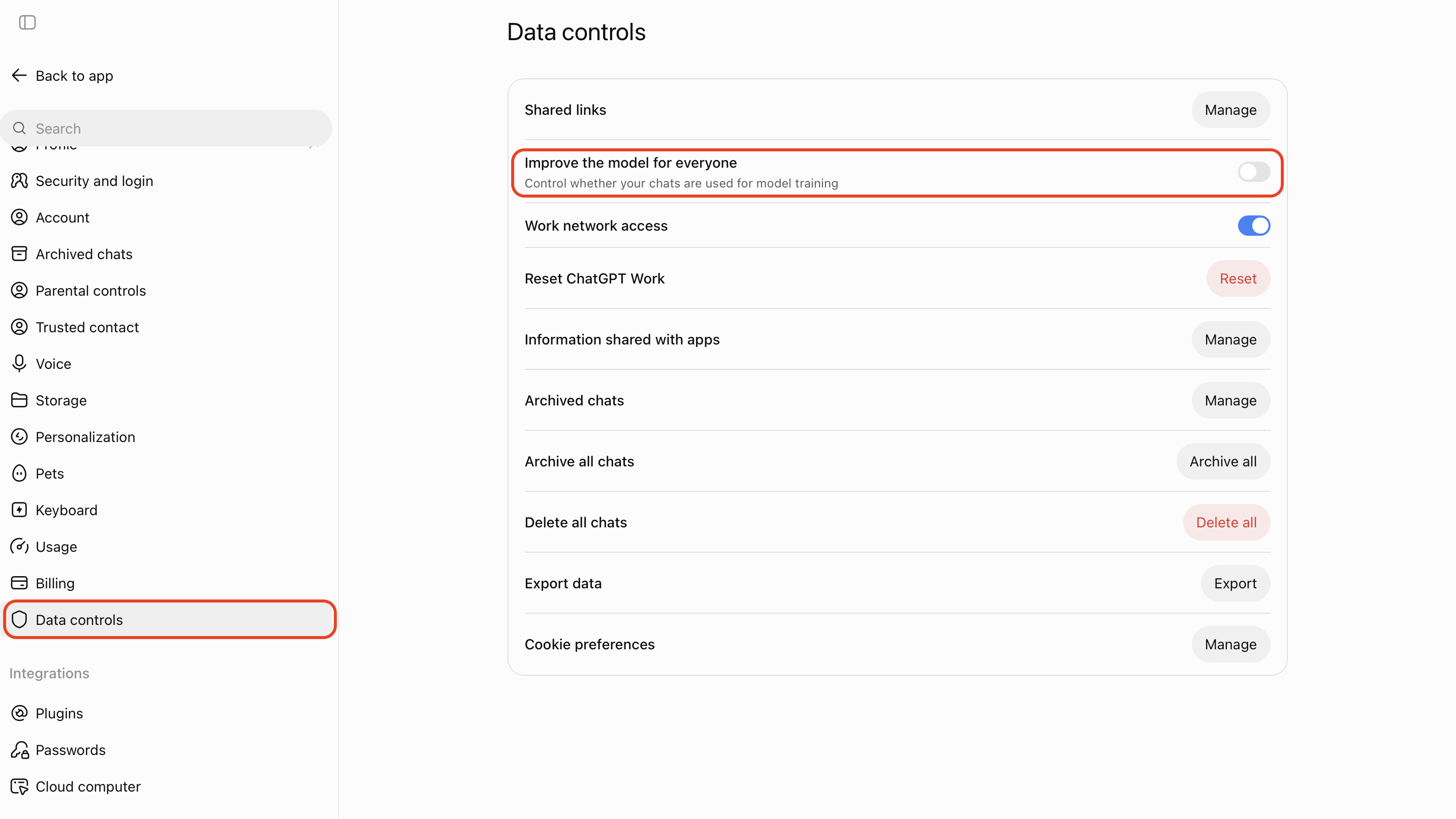
In Settings → Data controls, turn off Improve the model for everyone so OpenAI doesn’t use your new conversations to train its models
Keep in mind that disabling this setting isn’t retroactive: conversations you had with ChatGPT before you switched it off may already have been used to train AI models. There’s no way to undo that, but you can at least stop your future conversations from being used for this purpose.
Now let’s move on to Copilot and Microsoft. When journalists reached out, Microsoft representatives said the company uses user data in line with its terms of service and privacy policy. In particular, this processing may be done to improve its products and enforce Copilot’s usage rules. However, Microsoft didn’t comment in detail on the practice the journalists described in which user images are sent to contractors for review.
As for opting out of having your data used to train AI, the situation here is a murkier. Older versions of Copilot had a dedicated setting that let users stop their conversations from being used to train models. But after an August 2026 update, the toggle disappeared from the interface, and Microsoft’s current documentation no longer has instructions for turning it off.
Microsoft claims that user prompts, Copilot responses, and the contents of uploaded files aren’t used to train foundation AI models. That doesn’t mean the company never uses this data to improve Copilot, though. So the only surefire way to keep Microsoft from showing your images to strangers to make Copilot better seems to be not to upload them at all.
Finally, one general tip. As the investigations we’ve covered in this post show, AI developers have very broad access to the data users share with chatbots. So it’s wise to assume by default that your chats with AI aren’t private, and to avoid including anything you wouldn’t want strangers to see.
What other privacy problems come with using AI, and how can you fix them? Find out in our other posts: