Phishing emails are one of the most common online scams, and they often look convincing. These messages are designed to trick you into sharing information or downloading files by pretending to be from trusted sources.
What you need to know:
- Phishing emails are malicious messages designed to steal personal data, money, or account access.
- They often impersonate trusted companies or people and create urgency to trigger quick reactions.
- You can spot most phishing emails by checking the sender, links, and the request being made.
- Opening a phishing email does not always cause damage, but fast action helps reduce risk.
- Reporting phishing emails improves protection for everyone and helps stop future attacks.
- Temporary email services exist for convenience but do not protect against phishing.
What is a phishing email?
A phishing email is a scam message that pretends to be from a legitimate person or company to trick people. Their goal is to get people to share information or download something harmful, usually through a link.
Not all fake or spam emails are phishing emails. Many email spam messages are just unwanted ads. Phishing emails are different. They are designed to cause real harm and may be focused on stealing passwords and gaining access to your accounts. Even bank accounts are at risk. They often copy the look and tone of legitimate emails, so they feel safe to open (and they’re getting better at it).
The goal of a phishing email is action. If it gets you to click or enter personal identifiable information(PII), the attacker can move from a simple message to account takeover or data theft very quickly.
How does a phishing email work?
A phishing email works by impersonating a trusted sender and pushing you to take an action planned out by the attacker. This might be filling in details to supposedly “reset” a password or verify something on an account.
The message usually creates urgency or emotional pressure, such as a warning about account security or an unexpected problem. This pressure is meant to stop recipients from thinking critically or checking the request.
Phishing emails often include links or attachments. Links may lead to fake login pages that look real but are just a tool to capture your details. Attachments can install malware or open the door to further attacks. Once you act, the attacker can use the information or access they gain to cause further damage.
How to spot a phishing email?
Scammers are often very good at creating emails that look like they could be from legitimate companies or individuals. Scammers use the same logos and layouts as legitimate messages. Knowing how to tell if email is phishing, is a key skill.
It helps to know what to check before you click anything.
Characteristics of a phishing email
Phishing emails are designed to make you do something. The attacker usually wants login details or credit card information. They may try to get you to open a link or file that gives them access.
To achieve this, phishing emails blend trust and urgency. They often impersonate a real company or service you recognize, then add pressure to act quickly. An Amazon phishing email might use the iconic Amazon branding to look real and get users to enter a password or payment details without thinking.
In many cases, a single interaction is enough. One click or login attempt can hand over the information an attacker needs to move further.
Common warning signs of phishing emails
Some phishing emails look convincing, but small details often give them away. The sender’s address or domain name may look similar to a real one but contain extra characters or subtle changes – a zero instead of an ‘o’, for example.
Unexpected requests or instructions that don’t match how the company normally communicates are also common. Messages that ask you to confirm details, enter passwords, or make payments without context should raise suspicion.
Panic tactics are another strong signal. Emails that threaten account closure or heavy immediate consequences are designed to rush you into acting before you verify.
How to check links and attachments safely
Links in phishing emails often hide their true destination. The text may look like the real destination of a legitimate website, but the actual link can lead to a fake login page or malicious site.
Unexpected attachments are especially risky. Even common file types can be used to install malware or prompt unsafe actions once opened. It is also very rare that legitimate companies require downloads out of the blue. Think about where the request is coming from.
The safest approach is to avoid clicking links or opening files in the email itself. Instead, go directly to the official website or app you normally use and check for messages or alerts there.
What should you watch out for on mobile devices?
Phishing emails are often harder to spot on phones. Email apps often hide full sender addresses, and long URLs may be truncated to deliberately make them difficult to inspect.
Because of this, it’s safer to verify messages using official apps or bookmarked websites rather than interacting with emails on a small screen. If something feels off, switching devices or checking later can prevent accidental clicks.
Protect Against Phishing Email
Kaspersky Premium can help by flagging suspicious behavior and helping protect accounts over time.
Try Premium for FreeWhat types of phishing emails are most common?
Most phishing emails follow a few common patterns. Knowing these makes it easier to recognize scams quickly, even when messages look professional.
Account and login phishing emails
These emails pretend to be security alerts or password reset notices. They claim there is a problem with your account and push you to click a link to “fix” it, which leads to a fake login page.
Payment, invoice, and delivery phishing emails
These messages involve money or packages. They may include fake invoices or requests for payment. Some see refund notices, or delivery updates that ask for payment or personal details to resolve an issue that doesn’t actually exist. These can be used for identity theft or to steal directly.
Targeted phishing and impersonation
A type of targeted phishing called spear phishing uses personal details to sound believable. Executive impersonation scams copy the tone of managers or colleagues to pressure recipients into acting quickly while sounding more legitimate.
Phishing email examples
Seeing how phishing emails are usually structured can make warning signs easier to spot. While wording and branding change, many scams follow the same basic patterns.
What does a phishing email look like?
These emails are often comprised of:
- A company logo or other branding
- A short message explaining a made-up problem (security issue, missed delivery)
- A clear call to action such as a button or link
As we’ve mentioned, the language is usually urgent and direct, designed to move you quickly toward clicking or replying.
Once you know the structure, phishing emails become easier to recognize.
Real-world phishing email examples
Unfortunately, there are plenty of examples of these emails in circulation. Many phishing campaigns reuse the names of well-known brands because people already trust them.
- DocuSign phishing emails: A common docusign email phishing scam claims you’ve received a document that needs urgent review. The link leads to a fake login page designed to steal credentials.
- PayPal phishing emails: A paypal phishing email often warns of suspicious activity or an unauthorized payment, pushing you to “secure” your account quickly.
- FedEx delivery scams: A popular Fedex email phishing scam in 2025 typically claimed a package was delayed or needed a fee, using tracking language to feel legitimate and coming from domains that are slight variations of Fedex’s site.
- Apple and iCloud impersonation: An Apple phishing email may warn about storage issues or account suspension to prompt fast action.
- Renewal scams: Widely reported last year, these emails claim your McAfee subscription is expiring or auto-renewing, often including fake invoices and phone numbers. There were also McAfee-branded popups warning of infections. These automatically created urgency.
- Geek Squad phishing attempt: The Geek Squad is Best Buy's tech support service and emails from scammers pretending to be them may warn about expiring payment methods or action needed to stay covered.
- Microsoft account security alerts: These phishing emails claim there is unusual sign-in activity or a security issue with a Microsoft account, prompting recipients to “verify” their identity or secure the account via a link that leads to a fake login page.
Phishing emails also commonly impersonate banks, government agencies, and large retailers like Amazon. They may use authority and familiarity to try and avoid suspicion. A level of knowledge on information sensitivity is essential to keep data safe.
What happens if you open a phishing email?
Opening a phishing email can expose you to tracking and future targeting, but it does not always mean your accounts are immediately compromised.
Some emails include tracking pixels that confirm your address is active, which can lead to more phishing attempts. Others are designed to push follow-up messages or calls once they know someone has opened the email. The real risk usually begins when you click a link, download a file, or share information.
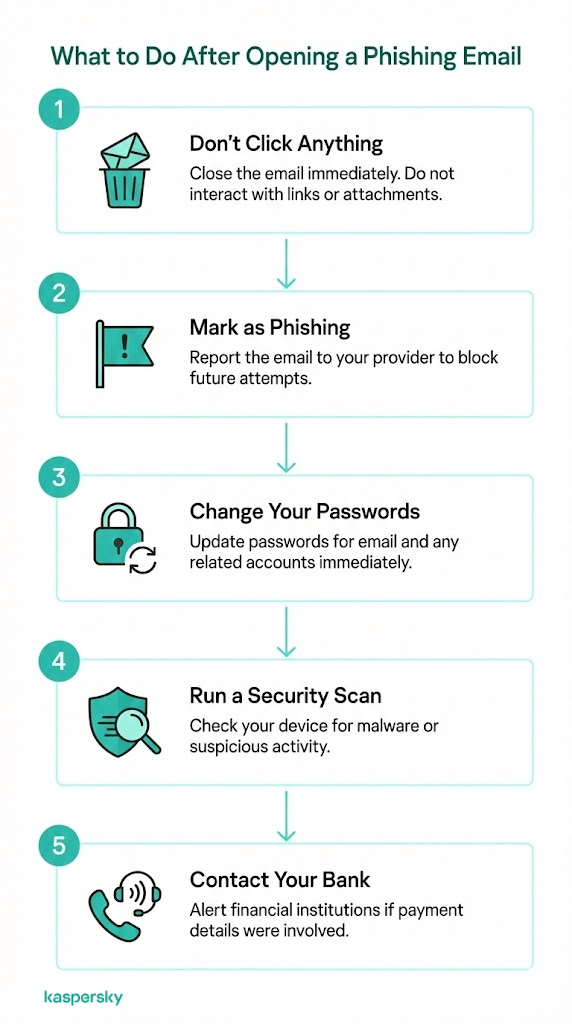
What to do if you open a phishing email
If you only opened the email and did not interact with it, close it and avoid clicking anything. Mark it as phishing or spam so your email provider can block similar messages in the future.
If you clicked a link or took action that the scammer wants, like downloading something, act quickly. Change passwords for affected accounts, starting with email. Run a security scan on your device and watch for unusual activity.
Contact your bank or service provider if payment details were shared or if the email involved financial accounts.
How to report email as phishing
Reporting phishing emails helps protect you and others by blocking similar scams before they spread further. In many cases, reporting is better than deleting because it improves filters and alerts the impersonated company to active scams using its name.
If an email looks convincing or impersonates a real service, reporting it can prevent future attacks and reduce repeat targeting.
How to report phishing emails to major services:
Outlook / Microsoft
How to report a phishing email in Outlook? First, select the message, choose Report, then Phishing. You can also forward it to phish@office365.microsoft.com. This applies to any Microsoft phishing email you receive.
Amazon
Forward the message to reportascam@amazon.com without clicking any links. Amazon will investigate and block similar scams.
PayPal
Forward suspicious messages to phishing@paypal.com. A PayPal phishing email often claims account or payment issues.
Apple / iCloud
Forward phishing emails to reportphishing@apple.com or abuse@icloud.com. You can also include screenshots or other evidence.
Netflix
Forward any Netflix phishing email to phishing@netflix.com. Netflix scams often reference payment failures or account suspension.
Reporting takes seconds and helps stop phishing campaigns from reaching more people.
How can you protect yourself from phishing emails long term?
Long-term protection comes from a level of awareness plus some simple habits that reduce risk before a phishing email can cause harm.
When a suspicious email arrives, pause and avoid clicking links or opening attachments. Verify messages through official apps or bookmarked websites instead of using email itself. Treat unexpected requests as a reason to check legitimacy. Being suspicious can be a very good thing!
Strong and unique passwords and multi-factor authentication add another layer of protection. Even if a password is exposed, MFA can prevent attackers from accessing your accounts. Keeping devices and software up to date also matters, as updates close security gaps that phishing campaigns often exploit.
Security software also provides you with a further layer of robust protection by blocking malware and protecting your identity online. Features like identity protection and real-time data leak monitoring provide further peace of mind.
Related Articles:
- How can you identify phishing scams effectively?
- What is the difference between spam vs phishing?
- What should you know about spear phishing attacks?
- What are the key signs of smishing attacks?
Related Products:
FAQs
Can my email be hacked by opening an email?
Usually no. Simply opening an email does not give attackers access, but interacting with links or files can create risk.
What if I open a phishing email but didn’t click anything?
You’re likely safe. Close the email, don’t interact with it, and mark it as phishing so similar messages are blocked.
Should you just delete phishing emails?
Delete them after reporting. Reporting helps protect others and improves email filters, deleting alone does not.