
Tip of the week: Protecting inexperienced PC users

Using the Trusted Applications mode Kaspersky Internet Security 2017 lets users launch only trusted, reliable apps.

Using the Trusted Applications mode Kaspersky Internet Security 2017 lets users launch only trusted, reliable apps.

Venturing online can be overwhelming in the beginning — even scary, and with good reason. To help beginners explore their PC and the Internet safely, turn on Trusted Applications mode in Kaspersky Internet Security 2017.

In this mode, users can launch only trusted software. Kaspersky Internet Security 2017 checks if the program is in the list of trusted applications. If not, our solution blocks the launch.

To activate Trusted Applications mode, open Kaspersky Internet Security and choose More Tools:

To activate Trusted Applications mode, open Kaspersky Internet Security and choose More Tools

Then choose Trusted Applications mode:
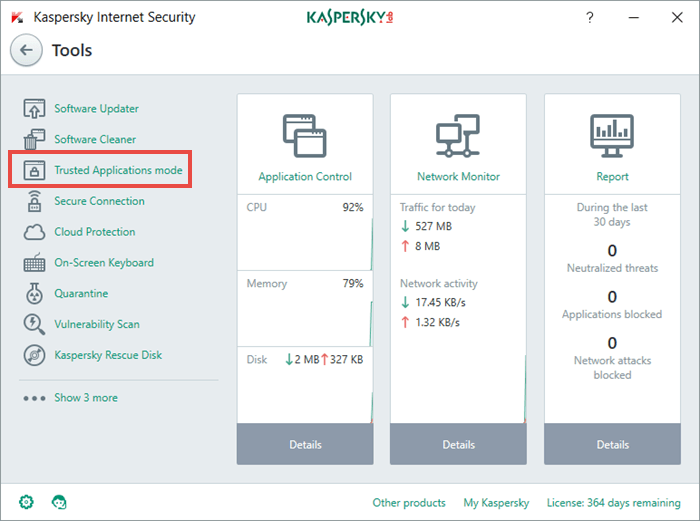
Then choose Trusted Applications mode

Last step: Click the Enable button and you’re done!
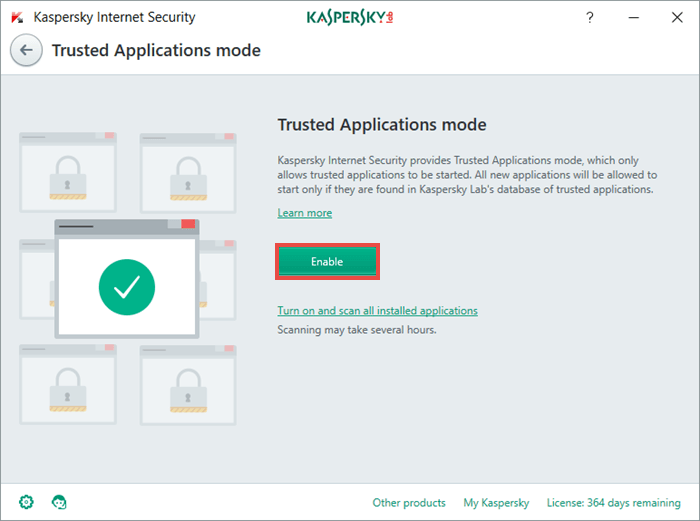
You can read more about Trusted Applications mode in our Knowledge Base.

You can read more about Trusted Applications mode in our Knowledge Base.

Tips

How to eavesdrop on a neural network

The Whisper Leak attack allows its perpetrator to guess the topic of your conversation with an AI assistant — without decrypting the traffic. We explore how this is possible, and what you can do to protect your AI chats.

The pros and cons of AI-powered browsers

A race between tech giants is unfolding before our very eyes. Who’ll be the first to transform the browser into an AI assistant app? As you test these new products, be sure to consider their enormous impact on security and privacy.